
How to Optimize Your Gaming Setup for Peak Performance in 2026
How to Optimize Your Gaming Setup for Peak Performance in 2026
Staring at your monitor while watching everyone else rack up kills? Yeah, I’ve been there. The frustration of losing gunfights you should’ve won, the lag spikes at the worst possible moments, the constant wondering if your system is actually holding you back.
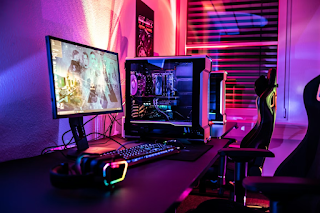
Here’s the thing: competitive gaming in 2026 isn’t just about skill anymore. It’s about having a machine that can actually keep up with what you’re trying to do.
And before you think I’m about to tell you to drop five grand on a bleeding-edge rig, hold on. Optimization isn’t always about money. Sometimes it’s about knowing which upgrades actually matter and which ones are just marketing hype.
Let’s talk about what you actually need.
The Brutal Truth About 2026 Gaming Requirements
Remember when 8GB of RAM was enough? Those days are dead.
Modern AAA titles—especially multiplayer games like Call of Duty: Black Ops 6, Escape From Tarkov, and Rainbow Six Siege—aren’t playing around anymore. The minimum specs have jumped significantly, and what used to be “recommended” is now barely scraping by.
If you’re running anything less than an Intel Core i5-12400 or AMD Ryzen 5 5600, paired with an NVIDIA GTX 1660 Super or AMD RX 6600, you’re going to struggle. Add 16GB of RAM and a 512GB SSD to that list. Even then, you’re looking at low settings with potential stuttering.
That’s not a gaming experience. That’s punishment.
The real question: what separates playable from actually competitive?
Building a System That Won’t Let You Down
For smooth gameplay in 2026—the kind where your system isn’t sabotaging your K/D ratio—you need to think bigger.
An Intel Core i7-13700K or AMD Ryzen 7 7800X3D makes a massive difference in frame consistency. Pair that with an NVIDIA RTX 4070 or AMD RX 7700 XT, bump up to 32GB of DDR5 RAM, and use a 1TB NVMe SSD. Now you’re talking about a setup that can actually support a 144Hz monitor.
Why does this matter beyond just “better graphics”? Because in competitive titles, frame drops and stuttering can look suspicious to anti-cheat systems. When your hardware can’t maintain stable performance, the irregular patterns might trigger additional scrutiny from platforms monitoring for anomalies.
It’s not about being flagged as a cheater. It’s about your system not behaving erratically in ways that draw unnecessary attention.
The CPU-GPU balance matters more than most people realize. Throwing a monster GPU into a system with a weak CPU creates bottlenecks. For mid-range builds, pair something like an RTX 4060 Ti or RX 7600 XT with at least an 8-core/16-thread processor—think Core i5-14600K or Ryzen 7 7700X.
High-end builds? You need power to match. An 850W+ PSU and a PCIe 5.0 motherboard aren’t overkill—they’re future-proofing.
Storage and Peripherals: The Forgotten Performance Factors
HDDs are extinct for gaming. Seriously, if you’re still loading textures from a spinning disk in 2026, you’re creating problems you don’t need.
SSDs aren’t just faster—they prevent load stutters that can appear as suspicious system behavior to anti-cheat monitoring. A PCIe 4.0 NVMe drive like the WD Black SN850 provides reliability over raw speed bragging rights.
Your monitor setup matters almost as much as your GPU. Competitive players targeting titles at Battlelog.co know that 144Hz+ refresh rates aren’t luxury—they’re standard. Response times under 1ms reduce motion blur, which translates to more accurate aiming in fast-paced shooters like Valorant and CS2.
Low-latency displays complement legitimate performance optimization. When you can actually see what’s happening without blur or ghosting, you don’t need sketchy advantages.
Software Configuration: Your Operating System Matters
Windows 11 (64-bit) is now the baseline for AAA gaming in 2026. It’s not just about compatibility—it’s about having an optimized OS that reduces background processes interfering with your game.
DDR5 RAM has become standard for new builds, handling AI rendering and multitasking that previous generations couldn’t manage. This isn’t about future-proofing anymore. It’s about current requirements.
Clean system configurations reduce the noise that anti-cheat systems monitor. Fewer running processes mean fewer potential conflicts or suspicious patterns in system behavior.
Legitimate Performance Boosting Without the Risk
Here’s where things get interesting: upscaling technologies like DLSS, FSR, and XeSS.
These features let you boost FPS at 1080p or 1440p by reducing GPU load while maintaining visual quality. It’s not cheating—it’s using built-in game features to optimize performance on lower-end systems.
The difference between this and sketchy modifications? These are official features supported by game developers. No ban risk, no detection concerns, just better performance from the hardware you already own.
Ray tracing, 4K@144Hz, VR/AR—these aren’t just buzzwords. They represent where gaming is heading. High-end GPUs like the upcoming RTX 5090 promise 20-30% gains over the RTX 4090, and AI rendering is becoming standard rather than optional.
But here’s the kicker: AI trends also mean anti-cheat systems are getting smarter. Behavioral detection, pattern analysis, hardware monitoring—these systems are more sophisticated than ever.
Which brings us back to why legitimate optimization matters so much.
When Your System Needs an Upgrade
If AAA games are dropping below 30 FPS at low settings, you’ve got a CPU or GPU bottleneck. Sometimes you can mitigate this by raising resolution to shift more load to the GPU, but that’s a temporary fix.
Identifying what’s actually throttling your system prevents you from wasting money on the wrong upgrade. It also prevents performance issues that anti-cheat systems might misinterpret as suspicious activity.
In games like Escape From Tarkov, where system monitoring is particularly aggressive, hardware that can’t maintain consistent performance creates irregular patterns. Not because you’re doing anything wrong, but because your rig can’t keep up.
The RAM Reality Check
16GB of RAM is the new floor for AAA games. But if you’re streaming, running Discord, and playing simultaneously? 32-64GB of DDR5 becomes necessary rather than excessive.
Running out of RAM in monitored multiplayer environments causes crashes and freezes that create unnecessary complications. More memory isn’t about having the biggest numbers—it’s about preventing resource-related issues in environments where system stability matters.
What Actually Matters in 2026
Look, competitive gaming is more demanding than it’s ever been. But throwing money at the latest hardware without understanding what you actually need is how you end up with an expensive paperweight.
Focus on balance. CPU and GPU need to match. RAM needs to be sufficient for modern multitasking. Storage needs to be fast enough to prevent stuttering. Monitors need to be responsive enough to actually see what’s happening.
Everything else? That’s details.
The goal isn’t to have the most expensive setup. It’s to have a system that performs consistently, doesn’t create unnecessary complications with anti-cheat monitoring, and actually lets you focus on improving your gameplay instead of fighting your hardware.
Because at the end of the day, your setup should be invisible. You shouldn’t think about your frame rate, your load times, or whether your system can handle what you’re asking it to do.
You should just be playing.

Special Note
GHANACLASIC is committed to respecting copyright laws, including the DMCA. We showcase promotional songs to help emerging artists, producers, and labels gain exposure and boost their streaming and sales. Our aim is to support creativity without profit. If you believe your rights are being violated, please reach out to us at [email protected]. We're here to help!