
Google has updated its AI Mode with Canvas and three other features. Here’s how to try them.
Canvas And Google AI Mode Now Working Hand To Hand
Google has introduced significant enhancements to its AI Mode in Search, unveiling a new feature called Canvas along with three additional tools. These updates aim to make the search experience more engaging and interactive for users. Whether you appreciate concise summaries that provide quick insights or you lean towards the traditional approach of exploring links, these four innovative features are set to transform the way we seek and access information online. Here’s how you can try them out for yourself.
1. Ask Questions About Your Photos
You can now upload an image directly to Google Search on your desktop and ask questions about it. Google’s AI will analyze the picture, do some quick online research, and give you an answer along with links to the websites it used.
This is a massive step up from a simple visual match, allowing you to get deep context on anything you see.

-
Coming Soon: You will also be able to upload PDFs and files directly from your Google Drive to get summaries or help with your documents.
2. Design Plans with Canvas
Google is introducing Canvas, an interactive workspace that opens up right inside your search results. It’s perfect for coding, building websites, or creating a study plan, allowing you to generate content and refine it dynamically.
Instead of just getting a list of links on “how to plan a trip,” Canvas actually starts the planning document for you.

3. Real-Time Help with Search Live
Google is combining Google Lens with a live chat feature. You can point your camera at something in the real world—like a complex appliance, a plant, or a landmark—and have a live, back-and-forth conversation with the AI about it.
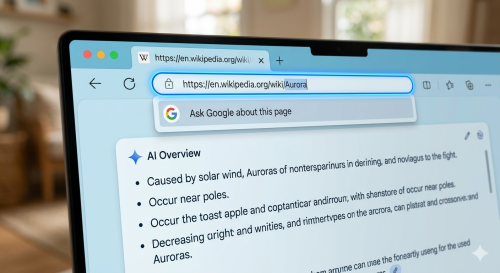
4. “Ask About This Page”
Soon, you won’t have to leave the website you’re reading to get more info. This update integrates AI directly into the Chrome browser’s address bar. You can simply click and select “Ask Google about this page.”
A side panel will pop up with a summary of the article and let you ask follow-up questions instantly without navigating away.
Want to take a break from tech updates?
If all this AI talk has you looking for a distraction, you can check out the latest trending shows and movies over on the Official Netflix Page.
What do you think? Do these features make AI Search feel more like a helpful tool, or do you still prefer the old way of googling?